Parendipity Logo

Parendipity vs. Ohai

Household help by request, or school and activity coordination from Gmail?

Ohai is a household assistant you can talk to, text, or send documents to. Parendipity concentrates on school, sports, and activities: connected Gmail supplies events and changes, and parents share the work that follows. Both help with family schedules. Your choice depends on whether you want broad household assistance or ongoing activity coordination.

Start your free trial30 days free. No credit card.

Parendipity and Ohai at a glance

We make Parendipity. This comparison was updated in October 2026. Plans and features can change; use the sources below to check the current details.

Parendipity vs Ohai: features and pricing
What matters to your familyParendipityOhai
Starting pointConnect Gmail for automatic school and activity monitoring.Text or speak a request; forward emails and share photos or documents.
CalendarsA shared app view with Google Calendar sync; Skylight can follow that calendar.A shared household view with Google, Outlook, and Apple calendar connections.
Household helpEvents, action items, pickup assignments, carpools, and weekly planning.Calendars, tasks, reminders, lists, and meals.
InteractionReview the shared schedule and assign family responsibilities in the iPhone app.An assistant for household requests, with human support for complex cases.
Published pricing$7.99 per child per month, capped at $19.99 per family. 30-day free trial.Free version; premium plans start at $9.99/month.

Scroll the table sideways to compare.

01

Consider how much you want to send.

Parendipity's Gmail connection is designed for the stream of school newsletters, league notices, and camp updates that keeps arriving during a busy week. You can still forward something separately when needed. Ohai's published workflow includes texting, speaking, and sharing emails or documents with its assistant. Decide whether choosing each item is useful control for your family or another task you would like to hand off.

02

Choose the scope of help you need.

If a grocery list, meal plan, and a household request belong in the same conversation for you, Ohai's broader scope may be useful. Parendipity's focus is the week around your children: the rescheduled lesson, permission deadline, pickup, and carpool. It groups events, actions, and FYIs so that reviewing the school day does not require searching through a conversation.

03

Compare the handoff, as well as the event.

A date on a calendar still leaves a question about who will handle it. In Parendipity, parents share the plan and assign pickup and dropoff responsibilities; carpools can involve another household. During a trial, use a real week with changing activities. Check whether both adults can find the update and see their own responsibilities without one parent relaying the details.

04

Keep your calendar connections clear.

Both products support connections to existing calendars. Parendipity syncs selected events to Google Calendar, which can feed your phones or a Skylight. If you use another assistant alongside it, choose which tool creates each event and review overlapping imports. A calendar connection does not automatically share every action item, responsibility, or permission from one product to another.


See what your family shares

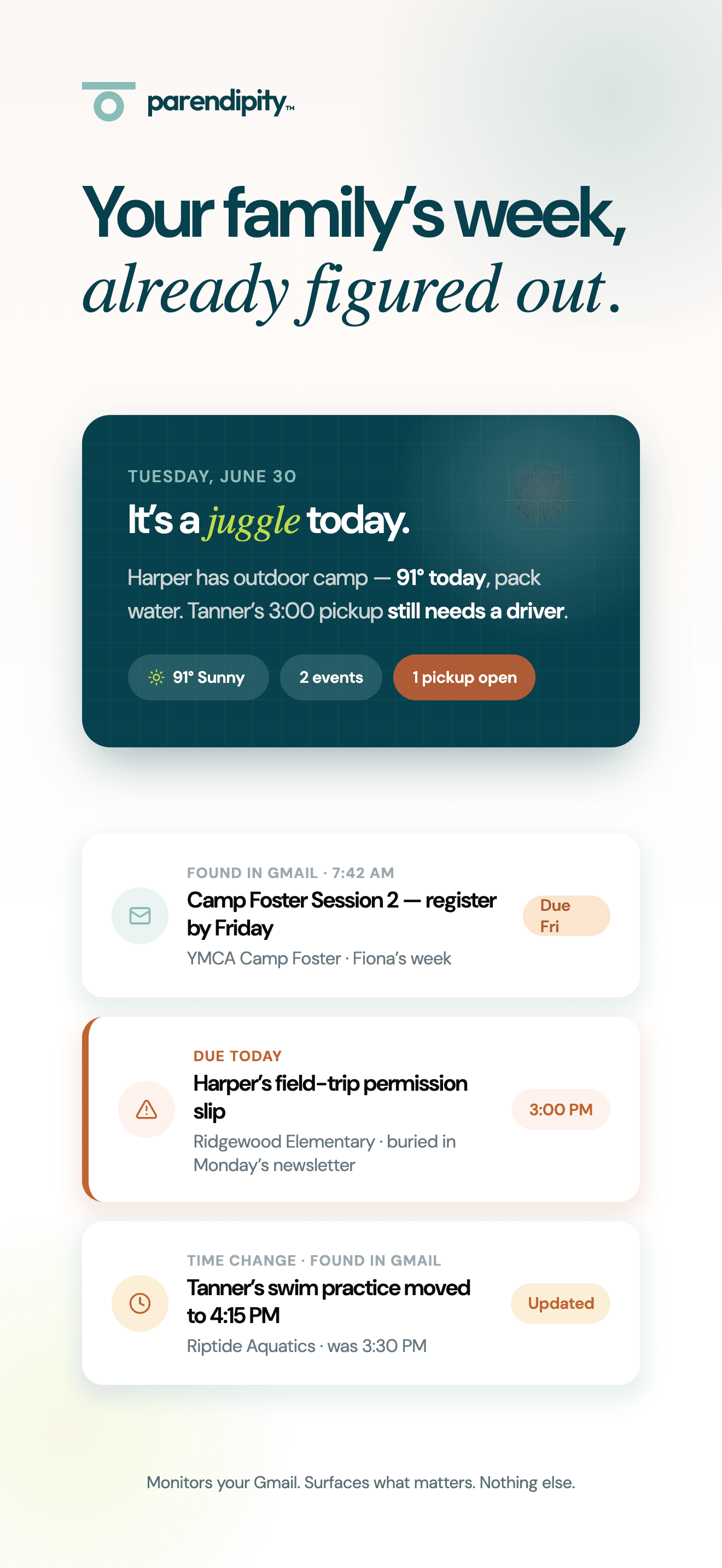
Parendipity product preview showing a school deadline, permission slip, and rescheduled practice
Schedule changes and action items from Gmail, together in Parendipity.
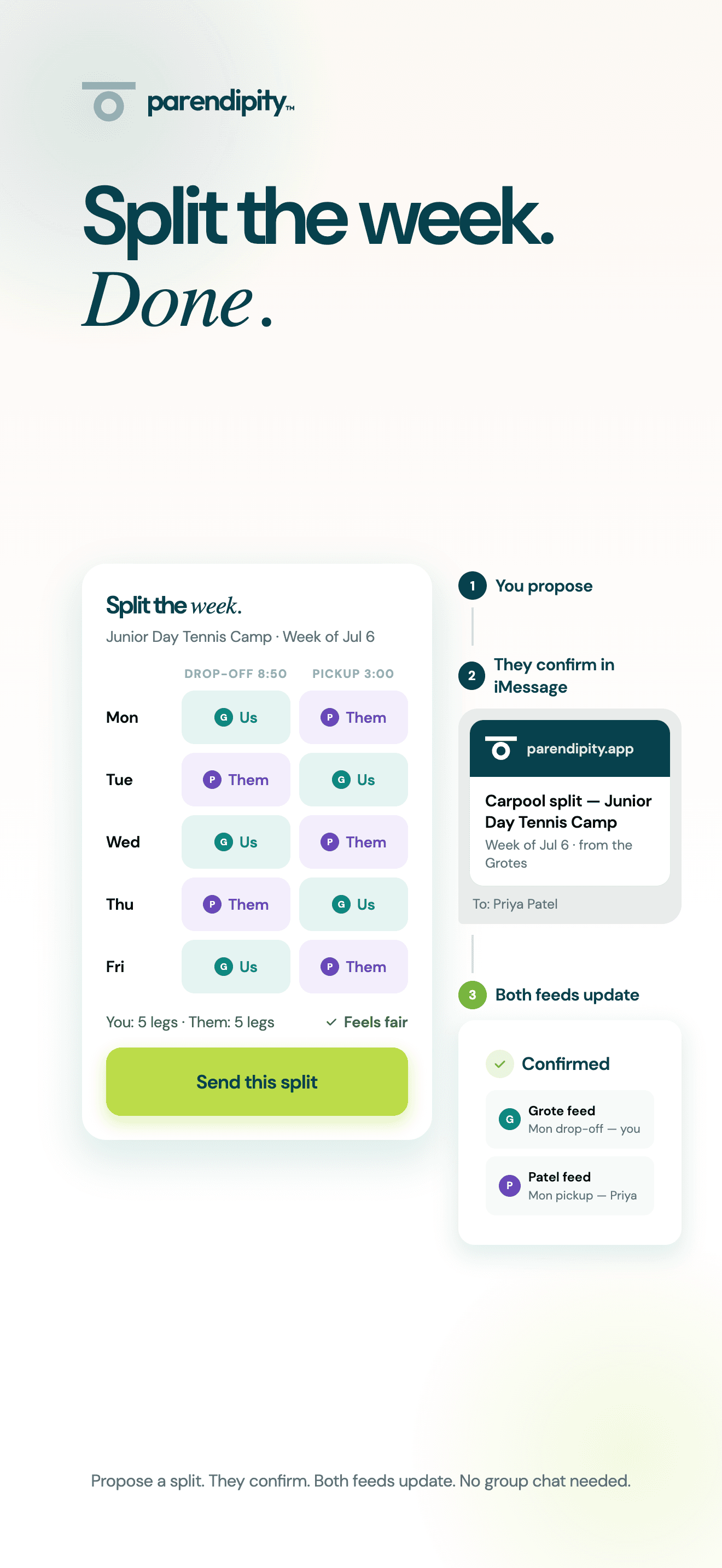
Parendipity product preview of family pickup and dropoff coordination
A shared view of the rides your family needs to cover.

Pricing, side by side.

Parendipity

$7.99/ child / month

Unlimited. Capped at $19.99 per family.

Ohai

Freecore household features

$9.99/ month starting price for premium plans

Ohai lists shared household calendars and family task coordination among its premium features. Check the current plan before subscribing.

Questions, answered.

How does Ohai handle school emails?

Ohai describes extracting dates and tasks from emails, PDFs, photos, and documents you send it. Parendipity connects to Gmail and monitors school and activity messages automatically, with separate forwarding available.

Does Ohai work with Google Calendar too?

Yes. Ohai lists Google Calendar, Outlook, and Apple Calendar connections. Parendipity supports Google Calendar sync. Calendar syncing alone is not the distinction; compare the intake workflow and how your family coordinates responsibilities.

Can I use both assistants?

You can use Parendipity for activity scheduling and another assistant for other household needs. If both add events to the same calendar, review your settings and any duplicates. This does not create a direct integration between the products.

Does Parendipity have an Android app?

Parendipity's mobile app is currently for iPhone. An Android co-parent can see events through a shared Google Calendar, but app-specific actions and coordination controls stay in Parendipity.

The calendar that fills itself in, and the coordination that follows.

Start your free trial30 days free. No credit card.